
One of the most important decisions when establishing a professional video streaming platform is determining how much network capacity the infrastructure requires.
While processors, memory and storage are important considerations, network bandwidth frequently becomes the primary limitation for servers distributing live video to large audiences.
A relatively modest server may successfully receive and distribute several encoded video streams. However, when hundreds or thousands of viewers connect simultaneously, the amount of outbound traffic can increase dramatically.
Broadcasters comparing dedicated streaming server packages should therefore evaluate both network port speed and monthly data transfer allowances before selecting a hosting configuration.
Understanding the relationship between video bitrate, audience size and viewing duration can prevent unnecessary infrastructure expenditure while reducing the risk of performance problems.
Bandwidth and data transfer are not the same thing
Hosting providers commonly advertise network connections of 1 Gbps or 10 Gbps alongside monthly traffic allowances measured in terabytes.
These specifications describe two different characteristics.
Network bandwidth represents the rate at which data can be transmitted through a connection. Monthly data transfer represents the total volume of data transmitted during a billing period.
A server with a 10 Gbps network port may still have a monthly traffic allowance of 20 TB.
Similarly, a server with a 1 Gbps connection may include a considerably larger monthly allowance.
| Specification | What it measures |
|---|---|
| Mbps | Megabits transmitted per second |
| Gbps | Gigabits transmitted per second |
| GB | Total gigabytes transferred |
| TB | Total terabytes transferred |
| Concurrent viewers | Audience connected simultaneously |
| Viewer-hours | Combined duration of audience viewing |
Both connection speed and monthly traffic allowance must be appropriate for the expected broadcasting workload.
Calculating bandwidth per viewer
The amount of bandwidth consumed by an individual viewer depends primarily on the bitrate of the delivered video and audio.
For example, a broadcast delivered at a combined bitrate of 4 Mbps requires approximately four megabits of data every second for each viewer.
To calculate hourly consumption in decimal gigabytes, use the following formula:
Hourly consumption in GB = bitrate in Mbps × 0.45
This produces the following approximate values:
| Total streaming bitrate | Data per viewer per hour |
|---|---|
| 500 Kbps | 225 MB |
| 1 Mbps | 450 MB |
| 2 Mbps | 900 MB |
| 3 Mbps | 1.35 GB |
| 4 Mbps | 1.80 GB |
| 6 Mbps | 2.70 GB |
| 8 Mbps | 3.60 GB |
| 12 Mbps | 5.40 GB |
These calculations exclude additional network and protocol overhead.
Actual consumption may vary when variable bitrate encoding or adaptive bitrate streaming is used.
How many viewers can a 1 Gbps server support?
A 1 Gbps connection provides a nominal network capacity of 1,000 Mbps.
Dividing this capacity by the delivered bitrate provides a theoretical maximum number of concurrent viewers.
However, professional streaming infrastructure should not normally operate continuously at its theoretical network limit.
Additional capacity is required for traffic fluctuations, protocol overhead, incoming broadcasts and other server activities.
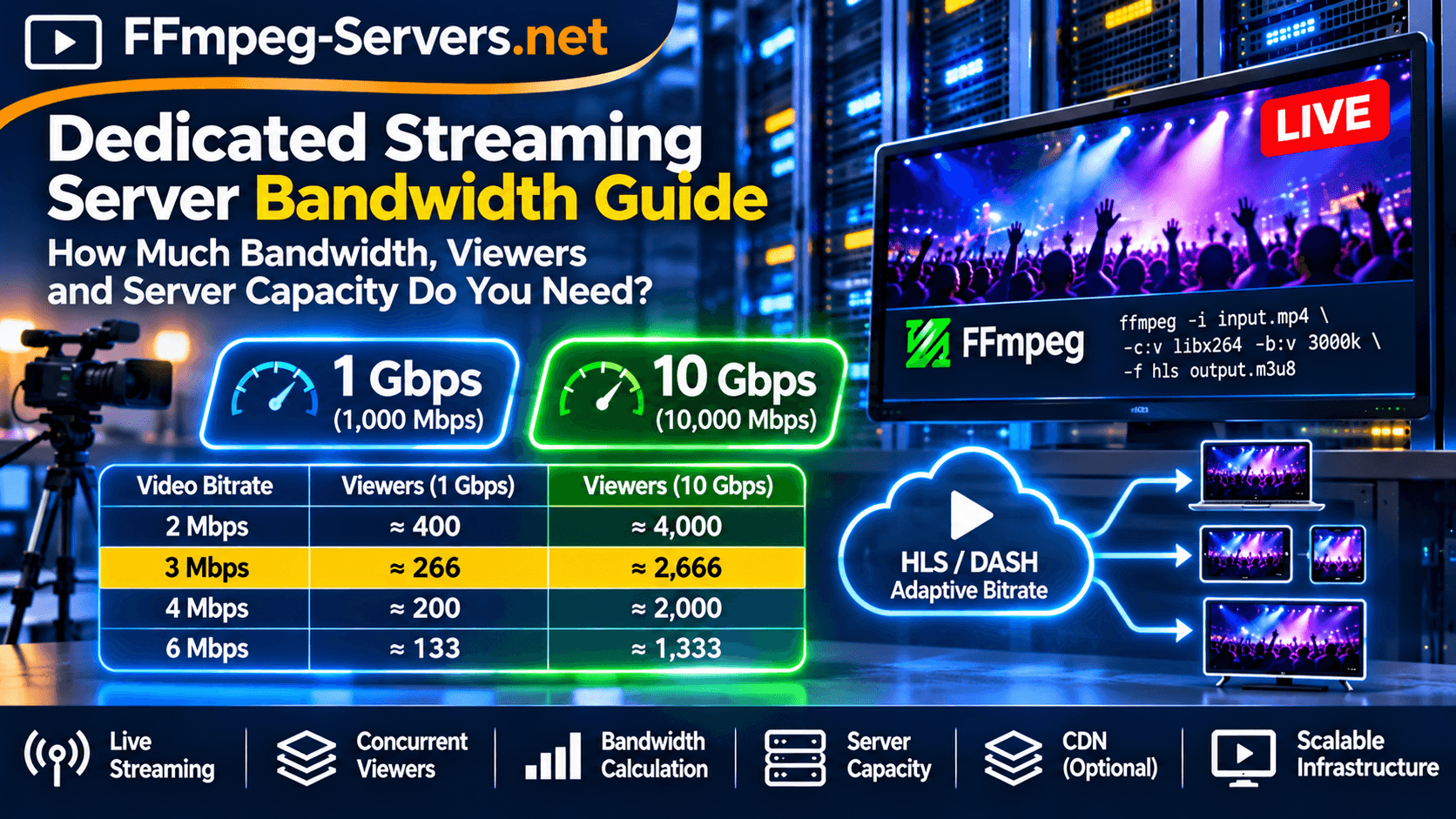
For illustration, the following table compares theoretical capacity with a planning target of 80% network utilisation.
| Streaming bitrate | Theoretical viewers | Viewers at 80% utilisation |
|---|---|---|
| 1 Mbps | 1,000 | 800 |
| 2 Mbps | 500 | 400 |
| 3 Mbps | 333 | 266 |
| 4 Mbps | 250 | 200 |
| 6 Mbps | 166 | 133 |
| 8 Mbps | 125 | 100 |
These figures assume that the network connection can sustain its advertised capacity and that no other bottlenecks are present.
The 80% utilisation target is an illustrative planning assumption rather than a universal technical standard.
Server performance, provider network policies and streaming software limitations may reduce actual capacity.
What changes with a 10 Gbps connection?
A 10 Gbps connection provides ten times the nominal throughput of a 1 Gbps connection.
For professional broadcasters delivering multiple channels or supporting large audiences, this additional capacity can provide considerable operational flexibility.
| Streaming bitrate | 1 Gbps at 80% utilisation | 10 Gbps at 80% utilisation |
|---|---|---|
| 2 Mbps | 400 viewers | 4,000 viewers |
| 3 Mbps | 266 viewers | 2,666 viewers |
| 4 Mbps | 200 viewers | 2,000 viewers |
| 6 Mbps | 133 viewers | 1,333 viewers |
| 8 Mbps | 100 viewers | 1,000 viewers |
However, a faster connection does not guarantee that a server can support these audience sizes.
Operating system configuration, CPU capacity, network interfaces, encryption overhead, streaming software and upstream network availability all influence actual performance.
A 10 Gbps connection also does not automatically provide unlimited monthly data transfer.
How quickly can a broadcaster consume 20 TB?
Monthly traffic allowances can be exhausted surprisingly quickly when delivering high-quality video.
Consider a hypothetical broadcaster with a monthly outbound traffic allowance of 20 TB.
At a constant delivered bitrate of 4 Mbps, each viewer consumes approximately 1.8 GB per hour.
A 20 TB allowance therefore provides approximately 11,111 viewer-hours.
The practical meaning of this allowance depends on audience size.
| Average concurrent viewers | Approximate broadcasting hours supported |
|---|---|
| 10 | 1,111 hours |
| 25 | 444 hours |
| 50 | 222 hours |
| 100 | 111 hours |
| 250 | 44 hours |
| 500 | 22 hours |
A broadcaster serving 100 simultaneous viewers could exhaust the allowance after approximately 111 hours of viewing at this bitrate.
This demonstrates why a high-capacity network port and a generous monthly traffic allowance must be evaluated separately.
Adaptive bitrate streaming changes the calculation
Modern streaming platforms frequently deliver multiple video quality levels.
Adaptive bitrate streaming allows compatible players to select a representation according to the viewer’s available connection speed and playback conditions.
A typical configuration might offer:
| Video quality | Illustrative total bitrate |
|---|---|
| 1080p | 5 Mbps |
| 720p | 2.5 Mbps |
| 480p | 1.2 Mbps |
| 360p | 600 Kbps |
Not every viewer receives the highest-quality stream.
Imagine an audience of 1,000 concurrent viewers distributed across these four representations.
| Quality | Viewers | Combined throughput |
|---|---|---|
| 1080p | 300 | 1,500 Mbps |
| 720p | 400 | 1,000 Mbps |
| 480p | 200 | 240 Mbps |
| 360p | 100 | 60 Mbps |
| Total | 1,000 | 2,800 Mbps |
The resulting average bitrate is 2.8 Mbps per viewer.
If all 1,000 viewers received the 5 Mbps representation, the required throughput would instead be 5 Gbps.
In this hypothetical example, adaptive quality selection reduces audience delivery traffic by approximately 44%.
However, generating multiple representations can increase server processing requirements. Broadcasters must balance network efficiency against the cost of transcoding.
Apple’s official HTTP Live Streaming documentation provides further information about adaptive video delivery and HLS technologies.
Using FFmpeg to manage streaming bitrate
FFmpeg provides extensive control over video encoding parameters, including bitrate, resolution, frame rate and compression settings.
A simplified example for encoding a 720p video with a target video bitrate of 2.5 Mbps is:
ffmpeg -i input.mp4 \
-vf scale=-2:720 \
-c:v libx264 \
-preset veryfast \
-b:v 2500k \
-maxrate 2500k \
-bufsize 5000k \
-c:a aac \
-b:a 128k \
output-720p.mp4
The video bitrate target is 2.5 Mbps, while the audio adds approximately 128 Kbps.
Actual output bitrate can vary according to encoder behaviour and content complexity. This command is an illustrative file-encoding example, not a complete live streaming configuration.
Administrators can consult the official FFmpeg documentation to explore additional rate-control and encoding options.
Reducing bitrate can lower bandwidth consumption, but excessive compression may introduce visible quality degradation.
The appropriate configuration depends on the type of content. Sports broadcasts and other fast-moving video generally present different compression challenges from interviews or static presentations.
Direct server delivery versus CDN distribution
Broadcasters do not necessarily need to deliver every video stream directly from their origin server.
A content delivery network can distribute compatible video segments through geographically dispersed infrastructure.
This may reduce the origin server’s outbound traffic while improving delivery performance for geographically distributed audiences.
| Direct dedicated server delivery | CDN-assisted delivery |
|---|---|
| Greater direct infrastructure control | Distributed delivery infrastructure |
| Origin handles viewer traffic | Edge servers can handle viewer traffic |
| Predictable server rental costs | Delivery costs depend on CDN pricing |
| Capacity limited by provisioned infrastructure | Can accommodate larger traffic peaks |
| Suitable for predictable audiences | Useful for geographically distributed audiences |
Some broadcasters prefer direct delivery because it offers greater control over infrastructure and operating costs.
Others benefit from CDN distribution when audiences are unpredictable or geographically dispersed.
A hybrid architecture can combine dedicated origin servers with external delivery infrastructure when required.
Calculating infrastructure cost per viewer-hour
Broadcasters should evaluate server costs in relation to the amount of video delivered.
Consider three hypothetical hosting configurations:
| Monthly server cost | Included traffic | Cost per included TB |
|---|---|---|
| $175 | 20 TB | $8.75 |
| $275 | 30 TB | $9.17 |
| $550 | 100 TB | $5.50 |
These figures are illustrative and do not represent a verified current quotation.
At an average delivered bitrate of 4 Mbps, a 100 TB traffic allowance provides approximately 55,555 viewer-hours.
If the entire allowance is consumed, a $550 monthly server would therefore have an infrastructure rental cost of approximately one cent per viewer-hour.
This calculation excludes software licences, storage, administration, taxes, backup services and other operational expenses.
A larger hosting package may provide better economics at high utilisation, but smaller packages can remain more economical when actual traffic is limited.
Planning for unexpected audience growth
Live events can attract significantly more viewers than anticipated.
A broadcaster expecting 100 simultaneous viewers may suddenly receive several hundred connections following social media exposure or a particularly popular event.
Professional infrastructure planning should account for both normal traffic and exceptional peaks.
Administrators should monitor sustained network throughput, concurrent connections, monthly transfer consumption, packet loss and playback errors.
Traffic alerts can provide advance warning when a server approaches its operational limits.
Maintaining spare capacity or arranging an appropriate expansion strategy is generally preferable to attempting an emergency infrastructure migration during an important broadcast.
Conclusion
Selecting a dedicated streaming server requires more than comparing processor specifications and monthly rental prices.
Video bitrate, concurrent audience size, viewing duration, network port speed and monthly traffic allowances all influence the capacity and economics of a broadcasting platform.
By understanding these relationships, broadcasters can estimate infrastructure requirements before purchasing hosting services.
FFmpeg encoding optimisation, adaptive bitrate delivery and carefully selected distribution architecture can further improve efficiency.
The objective is not simply to purchase the fastest available server, but to establish a reliable broadcasting platform capable of supporting its audience at a sustainable operating cost.
